This post about transitioning to the WordPress Ollie block theme is part of a series where we share our learnings on managing a hobby website. It’s intended for WordPress hobby website administrators.
We’ve invested a lot of time in BajanThings. We are often praised for how professional the BajanThings website looks. And, we are often asked how we built BajanThings?
Simple response: using the Ollie block theme using WordPress.
Longer response: in January 2024 we started to think about transitioning BajanThings from using a WordPress classic based theme to using a WordPress block based theme. Click here to read about moving BajanThings from a WordPress classic theme to a WordPress block theme: Moving BajanThings to the Ollie block theme.
In April 2024 we made the transition. Our block theme of choice is: Ollie developed by Mike McAlister and Patrick Posner. We are now block theme converts. The learning curve is steeper than using a classic theme – but you can customise so, so much more.
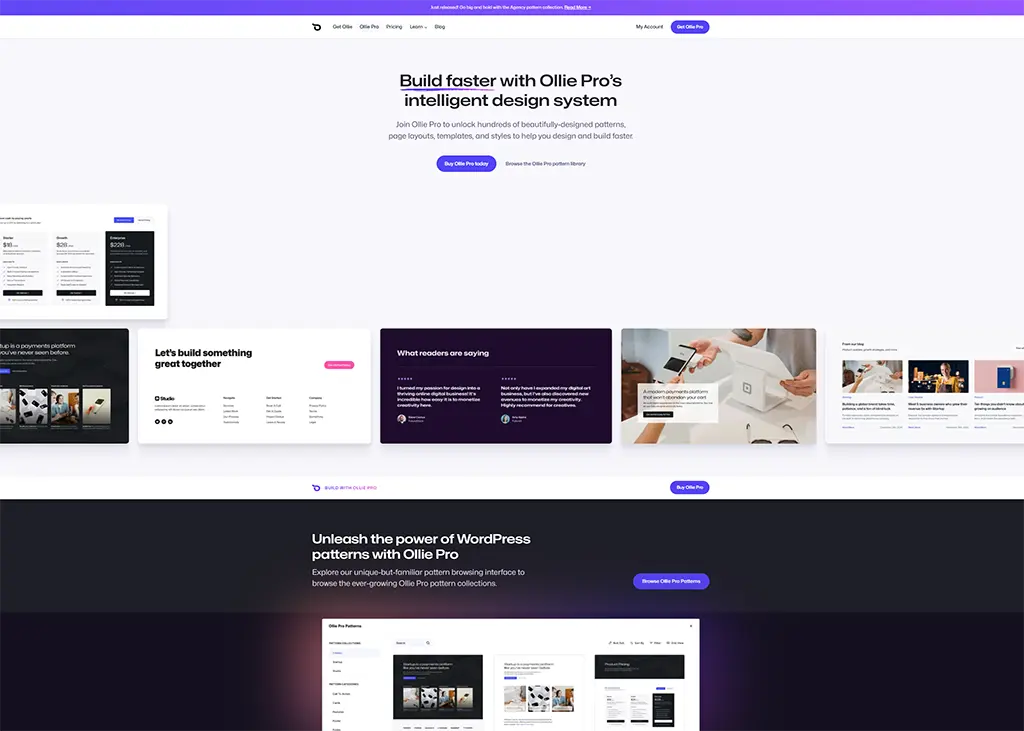
We are HUGE fans of the Ollie theme. It looks great and it works out of the box. There are two versions: the free version: Ollie and the paid version: Ollie Pro.
Both versions come with:
5 styles:
| Default | Agency |
| Creator | Startup |
| Studio |
And a palette of 8 curated colour combinations:
| Default | Blue |
| Green | Neon |
| Orange | Pink |
| Red | Teal |
The latest version of Ollie now has a very innovative new colour palette that we really like.
The free version of Ollie just has the basic Default patterns.
Ollie Pro has the basic Default patterns plus a suite of beautifully crafted patterns for the: Agency, Creator, Startup and Studio styles that can be mixed and matched.
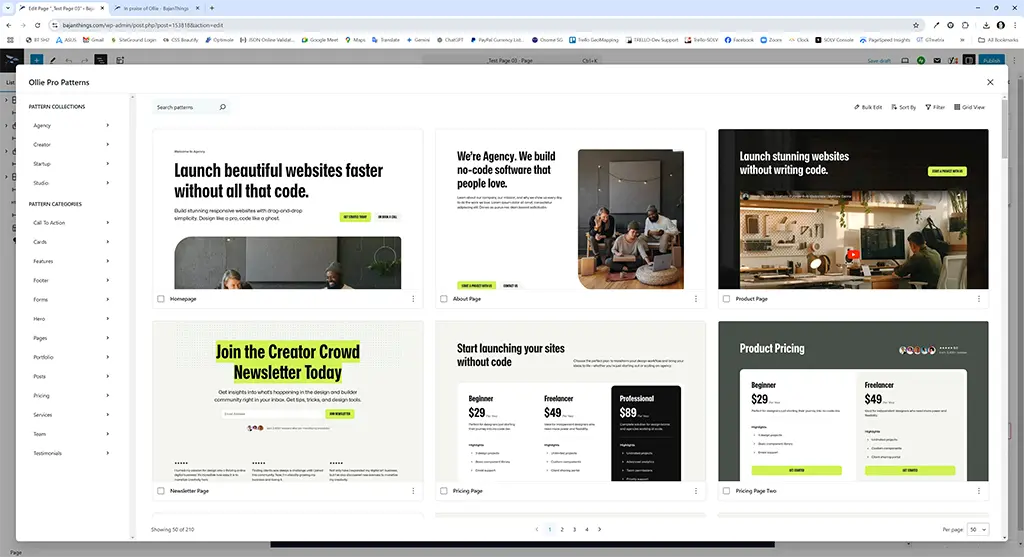
Within the Ollie Pro Pattern Library there are loads of pre-formed pattern examples for pages or for individual parts of pages whether that be a hero section or a call-to-action… Just pick what you want – tweak and go.
What we love is then drilling down and seeing how the pattern was put together. It’s like having a tutor sitting next to you when creating your page.
The Pro version also comes with support – something as early adopters we really value.
In addition to BajanThings we have a suite of family and friends and test domains we manage on a hobby basis. Way back when, our go-to set-up was the Twenty Seventeen classic theme, and then we transitioned to using the Weaver classic theme and then to using the Astra Pro classic theme. We have now updated all but one site to the Ollie block theme.
Some sites use the free version of Ollie. Some use Ollie Pro.
The transitioned sites include: 321321, Decimus Consulting, Eldrich Capital, Godson Associates, Lukenya, Little Welches Apartment Barbados, Luxury Portable Toilet & Loo Hire Yorkshire, Portable Chiller Trailer Hire Yorkshire, Ringwood Dogs, Veg2Table and XraYZulu, plus a few other domains that we will let expire in 2025.
The one site we have not converted from a classic theme to a block theme is: Art Treasures Gallery. This site is multilingual and uses the free PolyLang plugin and requires an English and Chinese navigation menu. The free version of PolyLang is not block theme compatible, so we have opted to stick with using the classic theme Astra.
For BajanThings we use a near vanilla version of the Ollie Pro block theme.
We started with the Ollie beta version, moved to Ollie when it was released on the WordPress.org theme library and upgraded to the Pro version when it was released. We started with a single license and later upgraded to the Freelancer version with 5 licenses.
BajanThings uses the Ollie – Startup Style with the Default colour palette.
For the templates, we have added one template and amended one template.
We added an Author Template that includes the Author bio.
We amended the Single page post template to include a sidebar.
All the other Ollie templates are vanilla out of the box with no tweaking to them.
For BajanThings we have also tweaked a few of the Global styles. These are the changes we have made:
Typography – Text: we tweaked the base text from 1.125rem to 1.35rem (ie we made the base text size a bit bigger for our audience).
Typography – Headings: we tweaked the H1 to H6 heading sizes:
| Heading | Default Size (rem) | BajanThings Size (rem) |
| H1 | 3.5 | 2.3 |
| H2 | 2.75 | 2 |
| H3 | 1.65 | 1.65 |
| H4 | 1.165 | 1.165 |
| H5 | 1.05 | 1.05 |
| H6 | 0.95 | 0.95 |
Under Global Styles we also tweaked a few blocks:
Quote Block text size: we tweaked the text size from the default 1.65rem to 1.25rem. The quote text is now just a little smaller than the base text size which is 1.35rem. In Ollie Quote text is larger to emphasise the quote.
Cover Block: Added Medium Dark drop shadow.
Feature Image Block: Added Medium Dark drop shadow.
Separator Block: set default colour to the Brand colour.
Global CSS: we added some CSS to tweak a few things within the theme:
Original CSS

/* CSS Below Here */

/* Ollie - Original Default Colour palette:
1) #4D34FA Primary (Purple)
2) #14111F Main(near Black)
3) #636381 Secondary (Dark Grey/Purple)
4) #D0CCDE Main Accent (Light Grey/Purple)
5) #E4E1FE Primary Accent (Light Purple)
6) #F6F6FC Tertiary (Light Grey/Purple)
7) #FFFFFF Base (White)

New Ollie Startup theme color palette (Jan 2025):
1)  #454DFF Brand
2)  #DBDDFF Brand Accent
3)  #B1C2FF Brand Alt
3)  #263042 Brand Alt Accent
5)  #171A1F Contrast
6)  #B6C7D9 Contrast Accent
7)  #FFFFFF Base
8)  #3B5570 Base Accent
9)  #F8F7F9 Tint
10) #DADEE3 Border Base
11) #444B57 Border Contrast

*/

/* === */
/* Meow Gallery this makes the background colour for mouse over of caption more transparent - Default transparency set to 70% changed to 30% */
.mgl-item figcaption {
    background: linear-gradient(0deg, rgba(0, 0, 0, .7), rgba(0, 0, 0, .3) 30%, transparent) !important;
}

/* === */
/* Meow Gallery makes link white - currently the theme default is black underline with hover of red. This adjusts link colour */
/* #FFFFFF - Base: White, #D0CCDE = Dirty Purple,  #4D34FA - Primary: Purple */

.mgl-caption a {
    color: #FFFFFF !important;
}
.mgl-caption a:hover {
    color: #454DFF !important;
    text-decoration: underline !important;
}

/* === */
/* Meow Lightbox uses default link colour - currently the theme default is black underline with hover of red.  This changes Meow Lightbox link to WhiteSmoke so it can be seen against Lightbox dark background */
/* #FFFFFF - Base: White, #D0CCDE = Dirty Purple,  #454DFF Brand: Purple */

.mwl a {
    color: #FFFFFF !important;
    text-decoration: underline !important;
}
.mwl a:hover {
  color: #454DFF !important;
  text-decoration: underline !important;
}

/* === */
/* Google map on mobile - this makes embedded Google map iframe responsive on mobile devices see: https://www.labnol.org/internet/embed-responsive-google-maps/28333/ */
/* You can change the value of padding-bottom (line #3) based on aspect ratio.  For a 4:3 map (600x450px) the calculation is 3/4 = 75.00%.  For a 16:9 map (740x415px) the calculation is 9/16 = 56.25%.  */
.google-maps {
  position: relative;
  padding-bottom: 75.00%;
  height: 0;
  overflow: hidden;
}
.google-maps iframe {
  position: absolute;
  top: 0;
  left: 0;
  width: 100% !important;
  height: 100% !important;
}

/* === */
/* Ollie Navigation - Highlight current menu item as bold and to set to #4D34FA - Primary: Purple */
.current-menu-item >a {
    color: #454DFF !important;
    font-weight: 600 !important;
}

/* === */
/* Ollie Navigation - Header Pattern - hover over-ride set to #4D34FA - Primary: Purple
 old colour which is a slighly lighter purple */
.wp-block-navigation-item a:hover {
    color: #4D34FA !important;
}

/* === */
/* Ollie Navigation - Highlight the parent page link when on a child page. Brian Coords suggested using the new CSS :has() selector - see: https://www.briancoords.com/fse-navigation-block-woes/ */
.wp-block-navigation-item:has(.current-menu-item)  {
   color: #454DFF !important;
}

/*This highlights the parent page link when on a child page when using the: Options for Block Themes plugin by Oliver Campion of Web:D which has an option for expandable submenus to the Navigation Block modal */
.wp-block-navigation.has-expandable-modal-submenus .wp-block-navigation-item:has(.current-menu-item)>a  {
   color: #4D34FA;
}

/* === */
/* Ad-Inserter formatting for Advertisements ad label */
.code-block-label {
  font-size: 1.05rem;
  color:#454DFF;
  padding-bottom: 1.75rem;
}

/* === */
/* Ad-Inserter hide all blank AdSense blocks */
ins.adsbygoogle[data-ad-status="unfilled"] {
  display: none !important;
}

/* === */
/* Fix for FSM Custom Featured Image Caption to stop caption appearing in Query Loops that include a Featured Image.  Our thanks to Carles Grau of Fesomia for providing this fix */
body.single ul figcaption.wp-caption-text {  display: none;
}
body.single ul .wp-caption.featured {
  margin-bottom: 0;
}
figure .wp-caption.featured {
  aspect-ratio: inherit;
}

/* === */
/* Fixes display glitch with a right aligned image in the first para where top of image is about 20px higher than the text - workaround suggested by Mike McAlister.  It's happening because the paragraph is getting the cascading top margin (which adds space all the way down the page), but the image isn't because it's floated. */

.wp-block-image.alignright {
    margin-top: var(--wp--preset--spacing--medium) !important;
}

/* === */
Updated CSS as of June 2025

/* CSS Below Here */

/* Ollie Default Colour palette:
1) #4D34FA Primary (Purple)
2) #14111F Main(near Black)
3) #636381 Secondary (Dark Grey/Purple)
4) #D0CCDE Main Accent (Light Grey/Purple)
5) #E4E1FE Primary Accent (Light Purple)
6) #F6F6FC Tertiary (Light Grey/Purple)
7) #FFFFFF Base (White)
*/

/* New Ollie Startup theme color palette (Jan 2025):
1)  #454DFF Brand (Purple)
2)  #DBDDFF Brand Accent (Light Grey Purple)
3)  #B1C2FF Brand Alt (Blue Purple)
3)  #263042 Brand Alt Accent (near Black)
5)  #171A1F Contrast (Black)
6)  #B6C7D9 Contrast Accent (Teal Grey)
7)  #FFFFFF Base (White)
8)  #3B5570 Base Accent (Dark Grey)
9)  #F8F7F9 Tint (Hint of Grey)
10) #DADEE3 Border Base (Light Grey)
11) #444B57 Border Contrast (Mid Dark Grey)
*/

/* === */
/* Meow Gallery this makes the background colour for mouse over of caption more transparent - Default transparency set to 70% changed to 30% */
.mgl-item figcaption {
    background: linear-gradient(0deg, rgba(0, 0, 0, .7), rgba(0, 0, 0, .3) 30%, transparent) !important;
}

/* === */
/* Meow Gallery makes link white - currently the theme default is black underline with hover of red. This adjusts link colour */
/* #FFFFFF - Base: White, #D0CCDE = Dirty Purple,  #4D34FA - Primary: Purple */

.mgl-caption a {
    color: #FFFFFF !important;
}
.mgl-caption a:hover {
    color: #454DFF !important;
    text-decoration: underline !important;
}

/* === */
/* Meow Lightbox uses default link colour - currently the theme default is black underline with hover of red.  This changes Meow Lightbox link to WhiteSmoke so it can be seen against Lightbox dark background */
/* #FFFFFF - Base: White, #D0CCDE = Dirty Purple,  #454DFF Brand: Purple */

.mwl a {
    color: #FFFFFF !important;
    text-decoration: underline !important;
}
.mwl a:hover {
  color: #454DFF !important;
  text-decoration: underline !important;
}

/* === */
/* Google map on mobile - this makes embedded Google map iframe responsive on mobile devices see: https://www.labnol.org/internet/embed-responsive-google-maps/28333/ */
/* You can change the value of padding-bottom (line #3) based on aspect ratio.  For a 4:3 map (600x450px) the calculation is 3/4 = 75.00%.  For a 16:9 map (740x415px) the calculation is 9/16 = 56.25%.  */
.google-maps {
  position: relative;
  padding-bottom: 75.00%;
  height: 0;
  overflow: hidden;
}
.google-maps iframe {
  position: absolute;
  top: 0;
  left: 0;
  width: 100% !important;
  height: 100% !important;
}

/* === */
/* Ad-Inserter formatting for Advertisements ad label */
.code-block-label {
  font-size: 1.05rem;
  color:#454DFF;
  padding-bottom: 1.75rem;
}

/* === */
/* Ad-Inserter hide all blank AdSense blocks */
ins.adsbygoogle[data-ad-status="unfilled"] {
  display: none !important;
}

/* === */
/* Fix for FSM Custom Featured Image Caption to stop caption appearing in Query Loops that include a Featured Image.  Our thanks to Carles Grau of Fesomia for providing this fix */
body.single ul figcaption.wp-caption-text {  display: none;
}
body.single ul .wp-caption.featured {
  margin-bottom: 0;
}
figure .wp-caption.featured {
  aspect-ratio: inherit;
}

/* === */
/* Fixes display glitch with a right aligned image in the first para where top of image is about 20px higher than the text - workaround suggested by Mike McAlister.  It's happening because the paragraph is getting the cascading top margin (which adds space all the way down the page), but the image isn't because it's floated. */

.wp-block-image.alignright {
    margin-top: var(--wp--preset--spacing--medium) !important;
}

/* === */
/* Ollie Navigation - Highlight current menu item as bold and to color set to  #454DFF Brand (Purple) */
.current-menu-item >a {
    color: #454DFF !important;
    font-weight: 600 !important;
}

/* === */
/* Ollie Navigation - Header Pattern - hover over-ride set to #4D34FA - Primary: Purple (old colour which is a slightly lighter purple) */
.wp-block-navigation-item a:hover {
    color: #4D34FA !important;
}

/* === */
/* Ollie Navigation - Highlight the parent page link when on a child page. Color is set to #4D34FA - Primary: Purple (old colour which is a slightly lighter purple) */
/* Brian Coords suggested using the new CSS :has() selector - see: https://www.briancoords.com/fse-navigation-block-woes/  */
.wp-block-navigation-item:has(.current-menu-item)  {
   color: #4D34FA !important;
}

/* === */
/* Ollie 1.4.0 adds collapsible mobile submenus - this CSS replaces the CSS used with the Options for Block Themes plugin by Oliver Campion of Web:D.  This CSS highlights the parent page link when on a child page with collapsible submenus for the Navigation Block modal.  Color is set to: #4D34FA - Primary: Purple (old colour which is a slightly lighter purple) */
.is-menu-open.has-modal-open .wp-block-navigation__container li.has-child button .wp-block-navigation-item:has(.current-menu-item)>a  {
   color: #4D34FA;
}

/* === */
/* Hover Effect for links - Inspired by TheVerge.com: adds a thick Purple #454DFF line on hover */
/* Excludes the class=
"site-header"
"wp-block-site-logo"
"wp-block-post-title"
"wp-block-button"
"taxonomy-category"
"wp-block-query-pagination"
"post-navigation-link-previous"
"post-navigation-link-next"
"post-navigation-link-next"
"wp-block-query-pagination"
"post-navigation-link-previous"
"post-navigation-link-next"
"wp-block-post-author"
"wp-block-comment-date"
"wp-block-jetpack-sharing-buttons"
"wp-block-jetpack-related-posts"
"home" which is the home/front page which means you don't need to exclude class="jetpack-top-posts-thumbnail" or class="jetpack-top-posts-thumbnail-link"  */
/* Does NOT exclude class="site-footer" as there are some links in the footer we want - hence exclude class="wp-block-site-logo" */
/* transition of 300ms added to give a smoother user experience */
/* box-sizing: border-box; ensures that the border-bottom applied on hover will not cause the element’s size to grow and shift unexpectedly */
a:not(.site-header a):not(.wp-block-site-logo a):not(.wp-block-post-title a):not(.wp-block-button a):not(.taxonomy-category a):not(.wp-block-query-pagination a):not(.post-navigation-link-previous a):not(.post-navigation-link-next a):not(.wp-block-post-author a):not(.wp-block-comment-date a):not(.wp-block-jetpack-sharing-buttons a):not(.wp-block-jetpack-related-posts a):not(.home a):hover {
  text-decoration: none; /* Removes underline of link */
  transition: color 0.3s ease-in-out, background-color 0.3s ease-in-out; /* Optional: smooth transition for the effect */
  border-bottom: 9px solid #454DFF; /* Add a Purple border below */
  box-sizing: border-box;
}

/* === */
/* Formidable Button - match Ollie button underline on Hover  */
.frm_button_submit:hover {
text-decoration: underline;
}

/* === */
In addition we added three plugins to handle things missing from WP block themes:
Code Snippets Plugin: we have snippets to add: Estimated Time to Read Shortcode, Count of Comments on Posts Shortcode, Current Year Shortcode which are used in the Single Post Template and in the Footer Pattern.
Options for Block Themes Plugin: this adds collapsible submenu navigation on mobile devices, something WordPress block themes still has to implement in core. [we have now removed this as Ollie now has this baked in]
The Icon Block Plugin: which add icons to block themes and allows custom SVG to be added to create custom icons (more on that later).
Smooth Back To Top Button Plugin: which adds a Back to Top icon (similar to the one we had using Astra Pro).
For the handful of pages, we have used the Page (Full Width, No Title) Template and added a Cover block followed by a column block and a cut down version of the side bar which we set up as a pattern (that way we can change the sidebar setting centrally). The use of the cover block on our Pages is a hark back to the WordPress Twenty Seventeen Theme that had full width Header Images as a background for the Page Title. Way back when, the Twenty Seventeen Theme was our go to theme before we moved to Astra Pro.
One key tip with Block Themes is the navigation menu setup. Based on our experience: do not to use the navigation menu that ports over from the classic theme. It’s extra work, spend the time and re-set up the navigation from scratch using the block theme editor. What we found was this was the only way to get the parent links we use in the Global CSS to work. Using the ported over version they were not highlighted (it was if they were not linked properly)!
That’s it everything else is Ollie Pro out of the box. Do go and check out the Ollie Block theme. It’s super cool.
Ollie is a beautifully designed block theme. It works out of the box. It looks great too. We love Ollie…. it really showcases BajanThings.com.
Some addition info – Ollie in use: Jamie Marsland often does YouTube videos where he replicates the design of prominent websites to showcase the flexibility of block themes.
Here is a quick mock-up we did using the Ollie block theme.
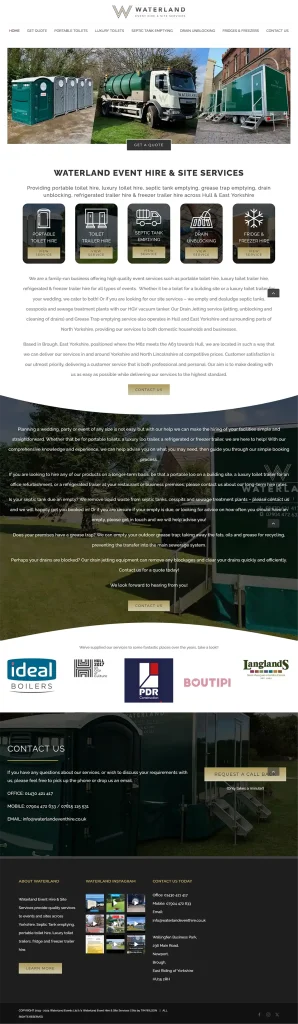
Here we have replicated the homepage of my niece’s website: Waterland Event Hire and Site Services (WEH&SS). The WEH&SS website is built using Avada. Next to it is a mock-up built using the Ollie block theme.
This mock-up of the WEH&SS front page was just an exercise. The mock-up front page is not live – it is set as a draft. We built the mock-up page a few weeks ago while updating the Portable Chiller Trailer Hire Yorkshire website from Twenty Seventeen to Ollie.
This was an exercise to see how easy it might be to replicate a website like WEH&SS using Ollie. We might be a little biased, now we’ve learnt our way around block themes, replicating the WEH&SS front page was very, very easy to do using the out-of-the-box Ollie block theme!
Waterland Event Hire and Site Services front page
built using Avada
Mock-up of Waterland Event Hire and Site Services front page
built using Ollie
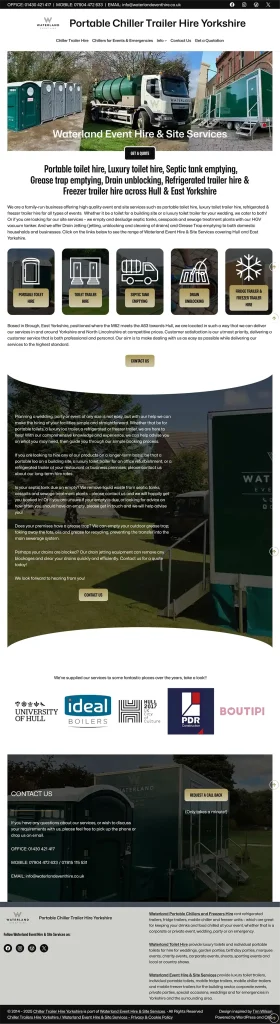
The GET A QUOTE button under the cover block feature image is in a Group with a negative margin set to -20px so the button and the feature image overlap. And the button border is set to 4px and white to provide the impression of a gap.
The 5 buttons are a cover blocks with an image background overlaid with a transparent icon image and a button that are in a Grid Block – with the Min Column Width set to 200px.
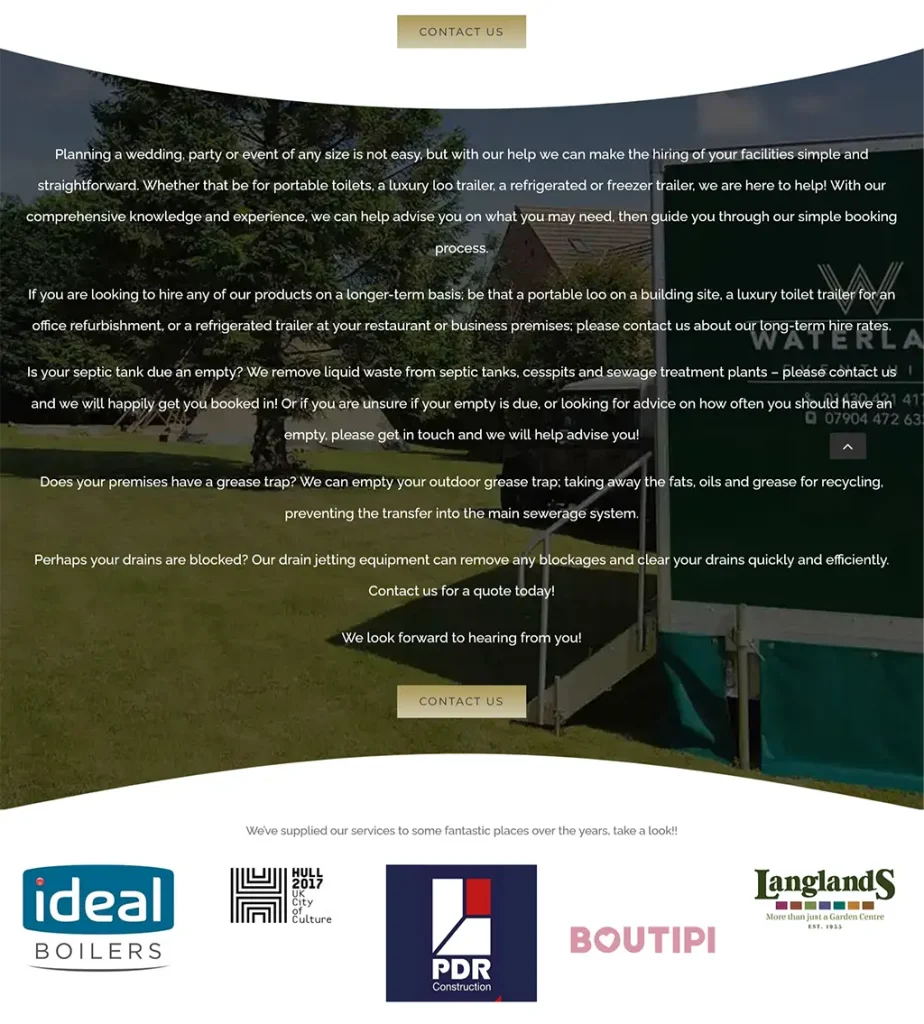
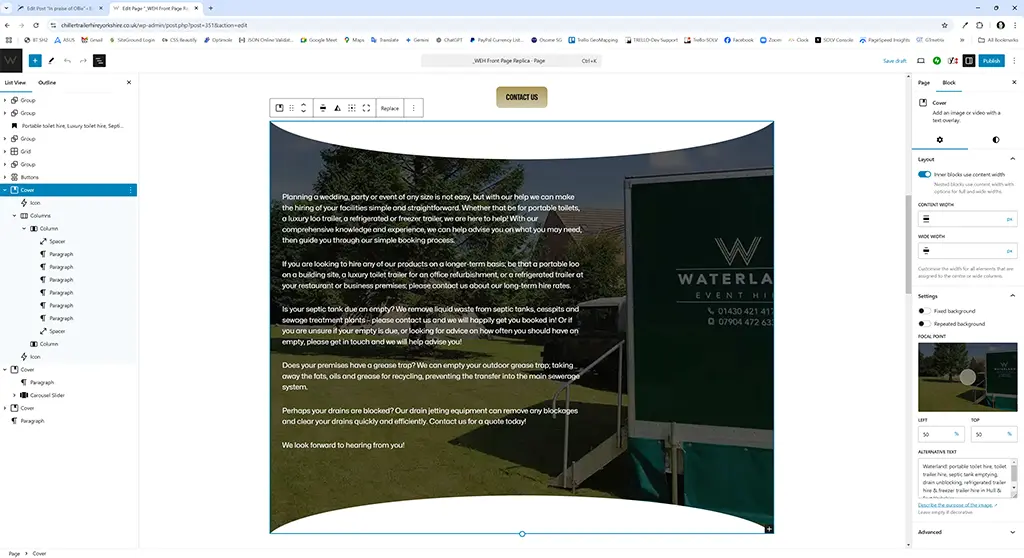
The image with the curved top and bottom which uses a built-in Avada feature was easy to reproduce using a cover block with a SVG top and bottom mask which was inserted via the Icon Block. The icon block allows you to insert Custom SVG code.
Here is the Custom SVG code that created the top and bottom masks:
SVG - Top -> created using https://svgeditoronline.com/editor/ with the output then edited

<svg xmlns="http://www.w3.org/2000/svg" xmlns:xlink="http://www.w3.org/1999/xlink" version="1.1" width="1024" height="80" viewBox="0 0 1024 80">
<g transform="matrix(13.29 0 0 -2.46 512 36.06)"  >
<path style="fill: #ffffff; fill-rule: opacity: 1;" transform="translate(-48, -48)" d="M 9.113 65.022 C 11.683 45.575 28.302 30.978 48 30.978 c 19.696 0 36.316 14.598 38.887 34.045 H 9.113 z" />
</g>
</svg>

---

SVG - Bottom -> created using https://svgeditoronline.com/editor/ with the output then edited

<svg xmlns="http://www.w3.org/2000/svg" xmlns:xlink="http://www.w3.org/1999/xlink" version="1.1" width="1024" height="80" viewBox="0 0 1024 80">
<g transform="matrix(13.29 0 0 2.46 512 44.06)"  >
<path style="fill: #ffffff; fill-rule: opacity: 1;" transform="translate(-48, -48)" d="M 9.113 65.022 C 11.683 45.575 28.302 30.978 48 30.978 c 19.696 0 36.316 14.598 38.887 34.045 H 9.113 z" />
</g>
</svg>
The slider showcasing some of the companies WEH&SS has worked with, uses a built in Avada feature which was reproduced using the lightweight Carousel Slider Block plugin by Virgildia which was recommended in a Jamie Marsland YouTube video.
The Back To Top Button icon also a built in Avada feature, uses the Smooth Back To Top Button plugin by Tanvirul Haque which we use on BajanThings.
All in all replicating the WEH&SS website front page using the Ollie block theme was easy peasy! I think we nailed it!
There is, however, a BIG caveat!
The BIG Caveat is: The conversion of an Avada based website or for that matter, any WordPress website built using a proprietary page builder, back to a native block theme, will be time consuming. The amount of work will depend on the number of pages/posts.
We don’t have any experience of using Avada. Based on looking at the HTML source code, it will involve re-creating each and every page/post – as Avada uses its own in-built page builder: Avada Builder. Avada does not use the native WordPress Gutenberg page builder.
Converting an Avada based website to a block based website is not a simple port from say a classic theme like Twenty Seventeen or Astra to a block theme like Ollie. Practically it will be a page by page, post by post rebuild as Avada Builder, the Avada page builder is propriety and the code it produces is incompatible with the native WordPress Gutenberg page builder.
The conversion process would require a staging site where each page/post would need to be systematically overwritten using the Gutenberg block editor, re-creating each page/post and section from the Avada site using Gutenberg blocks, while closely matching the design and layout of the original Avada website (as we did with the WEH&SS front page mock-up).
Critical for SEO is the URLs remain the same. During the conversion process the Avada site remains the master while each and every page/post on the staging site is converted to the native WordPress format. When completed and tested and having made back-ups of the Avada site – the staging site would be pushed to being live. The reason for having multiple back-up of the Avada site is if something goes wrong you can easily do a roll-back… that’s more down to me learning the hard way, some grey hair and some wisdom!
Having made the jump from classic themes to block themes, we are block theme converts.
Do go and check out the Ollie Pro block theme.
Having experimented with a number of other block themes – Ollie is now our go-to block theme .
The Ollie Pro version has a beautiful collection of patterns that can speed up the design of your pages… and given they are built using native WordPress blocks they are easy to tweak and refine to your specific needs.
We also value support that comes with the Pro version.