
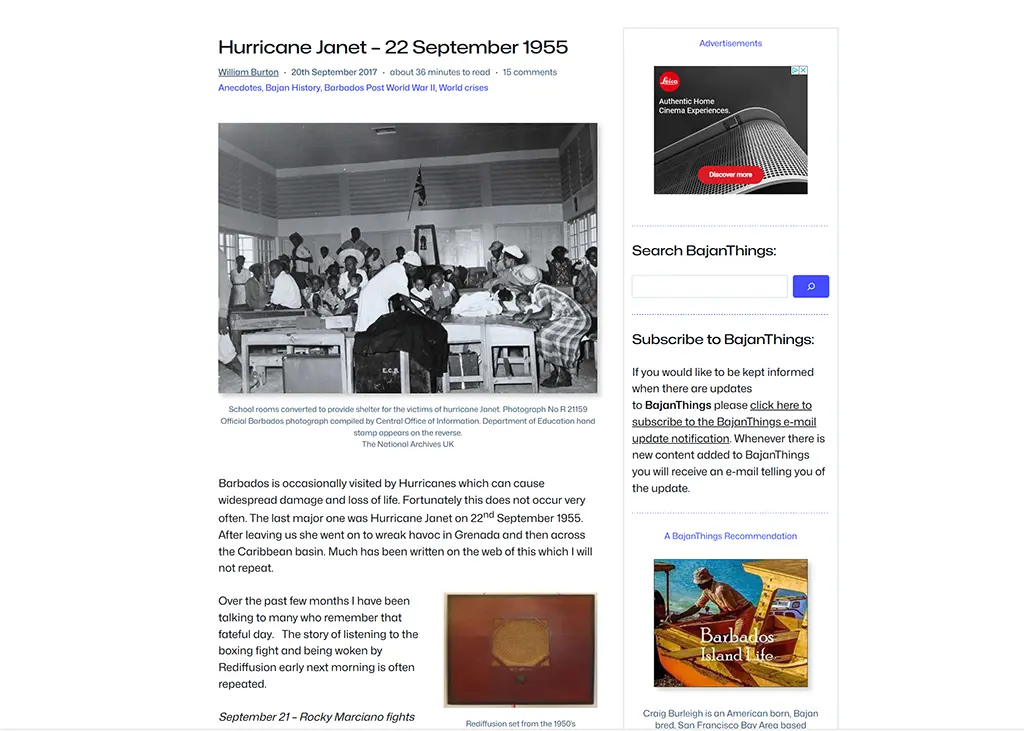
This post about Google AdSense Manual Ads is part of a series where we share our learnings on managing a hobby website. It’s intended for WordPress hobby website administrators.
This post was updated in September 2025. In this latest iteration we use the WordPress Plugin AdInserter by SpaceTime. We are fans of AdInserter and have a workaround for auto ad insertion within Post when using a block theme.
BajanThings.com is a hobby website started in December 2014. We added ads to the site in 2015 to help contribute to the annual costs of maintaining the BajanThings.com website.
Contrary to popular belief the annualised advertising revenue does not cover the cost of domain registration, hosting, WordPress theme, cache management, dynamic image delivery or specialist plugins needed to maintain BajanThings.com but it does make a contribution to the running cost of the website.
At the end of August 2024, based on visitor feedback, we implemented something new. We turned off the ads on BajanThings that appeared within the content areas of posts. The feedback was that ads within the content area of posts was seen as intrusive – which is probably one of the reasons why AdBlockers exist!
Between August 2024 and August 2025 ads only appeared in the header and footer and in the right sidebar. The content area of posts was set to be ad free.
Prior to doing this our daily ad revenue for the period 2023/24 averaged out at US63¢ per day.
Between August 2024 and August 2025 we knew our Google AdSense ad revenue would reduced, so as part of the experiment we are trialled a new combined approach of peripheral ads and donations and added a donation link in the navigation bar.
For the period 2024/25 when we removed ads from the content area of post the daily ad revenue dropped to US27¢ per day.
Our experiment of a new combined approach of peripheral ads and donations failed. At the end of August 2025 we reverted to having ads in the content area. The specifics of how we did this using AdInserter is detailed in the Update 2: September 2025 section at the bottom of this post.
What we did in August 2024
To make the change in August 2024 we moved from using the Google AdSense Auto Ads = ON setting, to the Google AdSense Auto Ads = OFF setting, and then implementing the placement of Google AdSense Manual ads. We set up 6 Display ads:
- BT_Header_Display (responsive sized)
- BT_Footer_Display (responsive sized)
- BT_Sidebar_top_Display (responsive sized)
- BT_Sidebar_mid_Display (fixed at 300×250)
- BT_Sidebar_bot_Display (responsive sized)
- BT_Content_In-article-page (responsive sized)
- BT_Content_In-article_post (responsive sized)
The code for these ads typically looks like this:
<script async src="https://pagead2.googlesyndication.com/pagead/js/adsbygoogle.js?client=ca-pub-xxxxxxxxxxxxxxxx"
     crossorigin="anonymous"></script>
<!-- BT_Footer_Display -->
<ins class="adsbygoogle"
     style="display:block"
     data-ad-client="ca-pub-xxxxxxxxxxxxxxxx"
     data-ad-slot="xxxxxxxxxx"
     data-ad-format="auto"
     data-full-width-responsive="true"></ins>
<script>
     (adsbygoogle = window.adsbygoogle || []).push({});
</script>
At the top of each ad is the call to the Google AdSense script that calls: adsbygoogle.js
<script async src="https://pagead2.googlesyndication.com/pagead/js/adsbygoogle.js?client=ca-pub-xxxxxxxxxxxxxxxx"
     crossorigin="anonymous"></script>
Then there is the Google AdSense ad call. Each ad code snippet also has a class=”adsbygoogle” identifier.
<!-- BT_Footer_Display -->
<ins class="adsbygoogle"
     style="display:block"
     data-ad-client="ca-pub-xxxxxxxxxxxxxxxx"
     data-ad-slot="xxxxxxxxxx"
     data-ad-format="auto"
     data-full-width-responsive="true"></ins>
<script>
     (adsbygoogle = window.adsbygoogle || []).push({});
</script>
Using a Block theme, it is very easy to insert these manual ads. For the footer and sidebar ads we added the code into a Custom HTML block within the Patterns for – header, footer and sidebar.
For the in-article ads we added the code again in a Custom HTML block directly into the page.
Easy peasy – or so it should have been!
To start with we were getting NO ads in the footer and only occasional ads in the sidebar.
The only ad that seemed to work consistency was the BT_Content_In-article_page that was placed within the content area of the: Ads on BajanThings page.
What appeared to be happening was that something was blocking the ads.
Long story short. It was two issues. Both associated with caching.
We use FlyingPress and FlyingCDN (which is built on Cloudflare Enterprise).
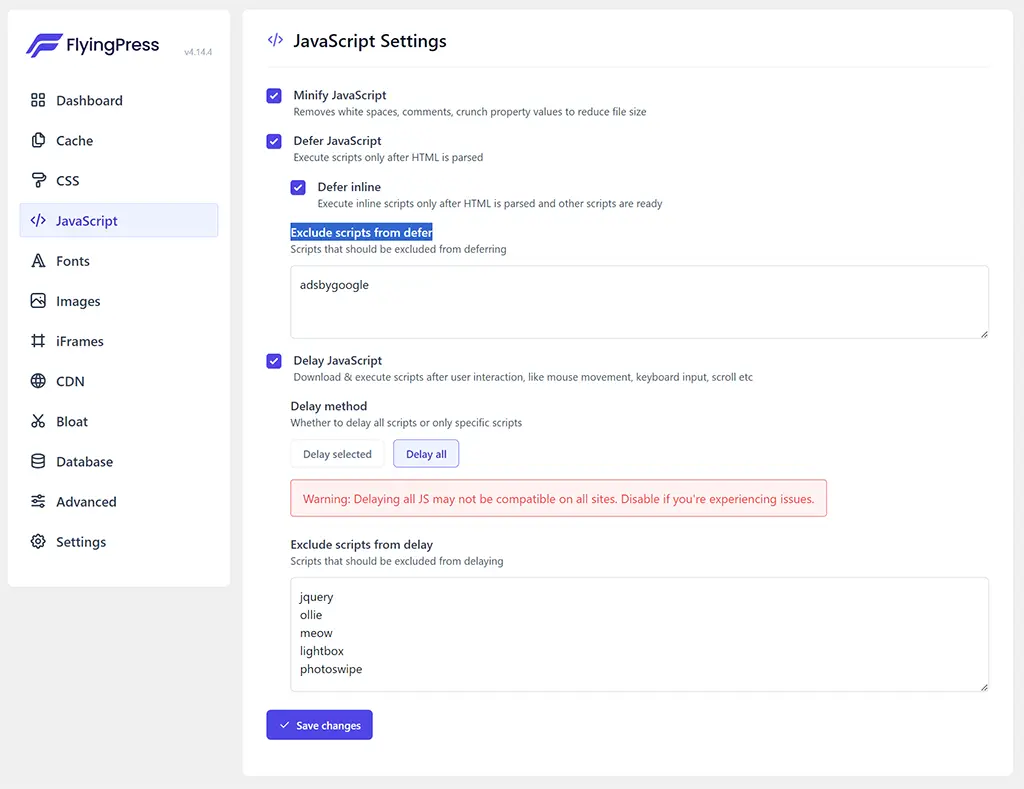
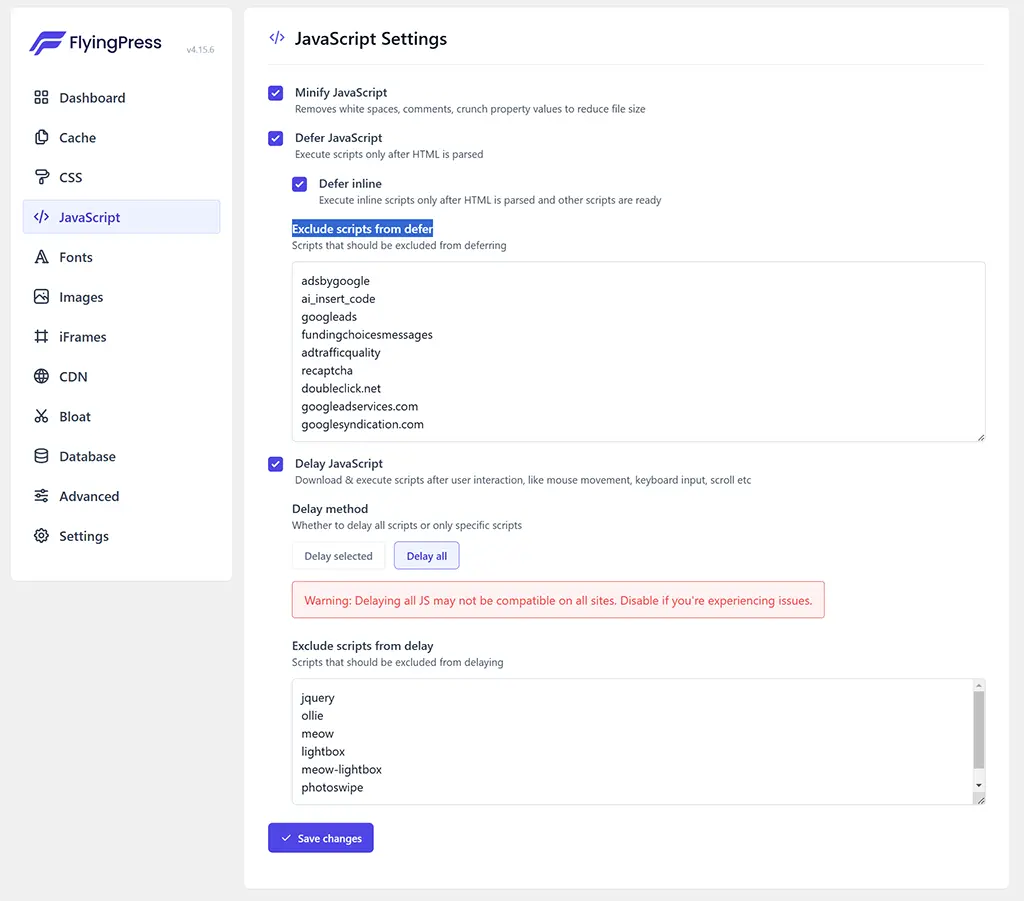
Getting the ads to serve was fixed by making a change to the FlyingPress, </> JavaScript Settings, by adding “adsbygoogle” (no quotation marks) to the: Exclude scripts from defer.
Doing this all the ads in the sidebar started to appear.
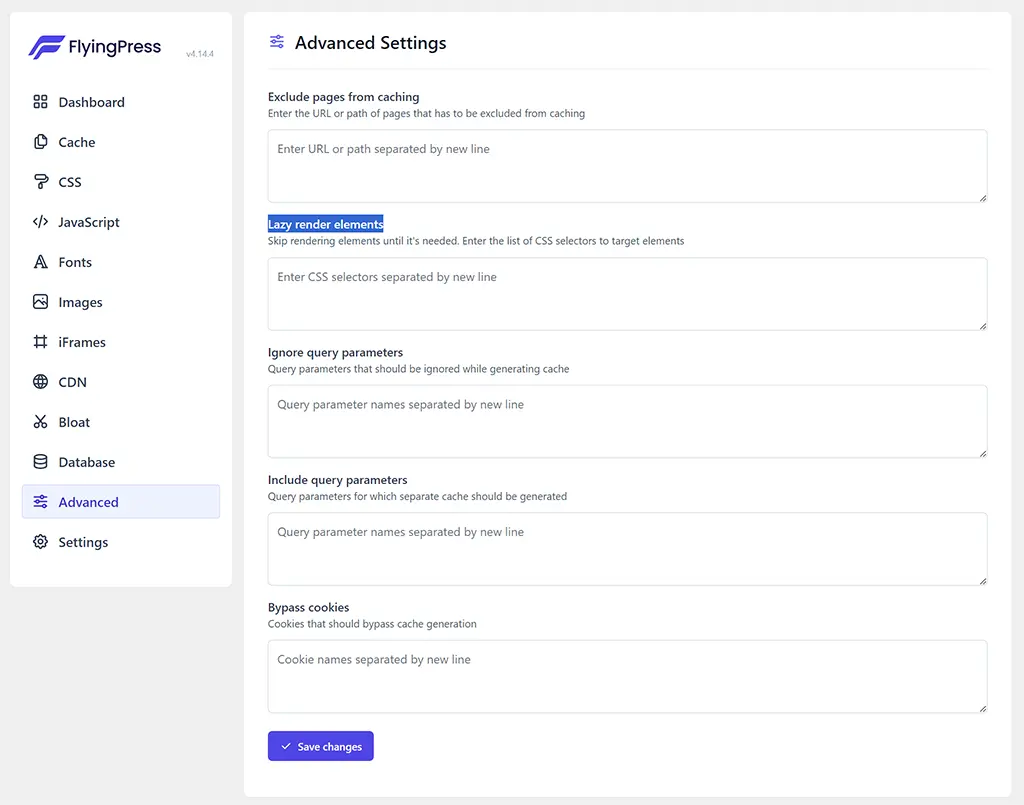
The ads in the footer were still being blocked. This was fixed by changing a default setting in the FlyingPress Advanced Settings. Out of the box the “Lazy render elements:” is populated with two fields:
- footer
- #comments
Removing these two fields – ads started to appear in the footer!
Wup. Wup. WUP – success.
Adding Google AdSense Manual ads allowed us to do something we were unable to do when we used Google AdSense Auto ads where Google AdSense automatically shows ads in the best places. One of the things we wanted to do was highlight to the BajanThings visitors where there was a Google AdSense ad.
To comply with this and avoid getting a Google AdSense Policy Violation notice and having Google ads turned off – the Google small print states publisher can only label Google AdSense ads with either “Advertisements” or “Sponsored Links“. It’s covered in the Google AdSense policy section under: “Placing ads under a misleading header”.
We have chosen to add Advertisements above each of the Google AdSense ads. The only downside is if Google does not serve an ad there is a blank space shown… however we have found a work-around for this!
We have opted to use the WordPress plugin: AdInserter to manage the ads. AdInserter has over 300,000 active installs and makes managing the Google AdSense code easier. We have chosen to use a shortcode link to insert all our ads within a paragraph block. The added advantage is Ad Inserter allows some formating of the ad ads such as centring them which means we don’t have to faf around with adding additional code to centre the ads.
AdInserter also allows us to dynamically add the ad label Advertisements above the ad position. In addition via some CSS, we have formatted the “Advertisements” ad label.
And now as the Google AdSense ad label is associated with the ad, if Google AdSense does not have an ad to server the the ad space is collapsed / hidden.
/* Ad-Inserter formatting for Advertisements ad label */
.code-block-label {
  font-size: 1.05rem;
  color:#454DFF;
  padding-bottom: 1.75rem;
}
/* Ad-Inserter hide all blank AdSense blocks */
ins.adsbygoogle[data-ad-status="unfilled"] {
  display: none !important;
}
Useful Ad Inserter Documentation
- How AdInserter works
https://adinserter.pro/faq/how-ad-inserter-works - Ad label
https://adinserter.pro/documentation/plugin-settings
https://adinserter.pro/documentation/additional-block-settings - Hiding blank AdSense blocks
https://adinserter.pro/documentation/adsense-ads - How to optimize plugin settings
https://adinserter.pro/faq/how-to-optimize-plugin-settings - Debugging
https://adinserter.pro/documentation/debugging - Troubleshooting – JavaScript errors
https://adinserter.pro/documentation/troubleshooting#javascript-errors
Google AdSense decides what ads to show, where and when. Sometimes there are no ads to show and a blank ad is shown. Based on the Hiding blank AdSense blocks documentation, we have appended to the bottom of some of the Google AdSense ad code a fallback to a BajanThings House ad.
- 970×250 for: BT_Footer_Display ad
[ADINSERTER FALLBACK="adsense" code="insert"]

<a href="https://www.bajanthings.com/donate/" target="_blank" rel="noopener">
<img border="1" alt="BajanThings - Donate" src="https://www.bajanthings.com/wp-content/uploads/2024/09/BT_970x250_donate.webp" width="970" height="250" style="box-shadow:var(--wp--preset--shadow--natural)"></a>
- 728×90 for: BT_Content_In-article_page ad
[ADINSERTER FALLBACK="adsense" code="insert"]

<a href="https://www.bajanthings.com/donate/" target="_blank" rel="noopener">
<img border="1" alt="BajanThings - Donate" src="https://www.bajanthings.com/wp-content/uploads/2024/09/BT_728x90_donate.webp" width="728" height="90" style="box-shadow:var(--wp--preset--shadow--natural)"></a>
- 300×250 for: BT_Sidebar_top_Display, BT_Sidebar_mid_Display & BT_Sidebar_bot_Display ads
[ADINSERTER FALLBACK="adsense" code="insert"]

<a href="https://www.bajanthings.com/subscribe-to-bajanthings/" target="_blank" rel="noopener"><img border="1" alt="BajanThings - Subscribe" src="https://www.bajanthings.com/wp-content/uploads/2024/09/BT_300x250_Subscribe.webp" width="300" height="250" style="box-shadow:var(--wp--preset--shadow--natural)"></a>
Here is an example of our 300x250px medium rectangle house ad:

And for some of the Google AdSense ad positions like the BT_Header_Display (responsive) we have pasted in the Fallback code that hides the blank ads.
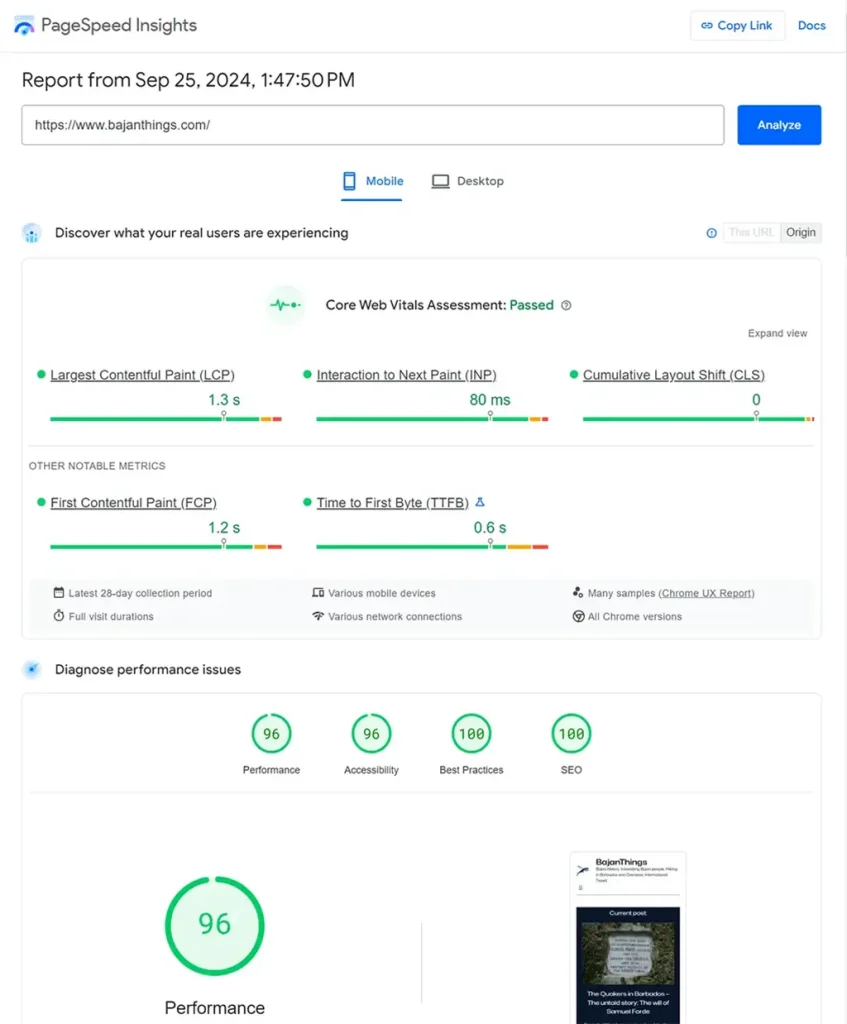
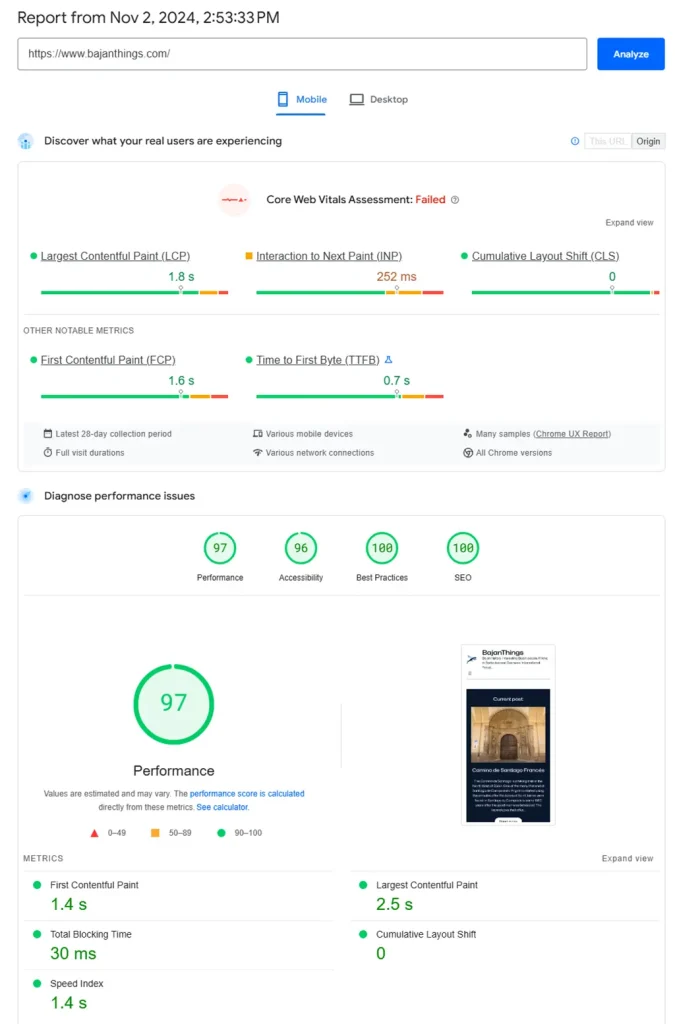
[ADINSERTER FALLBACK="adsense"]Finally, having implemented Google AdSense Manual ads using the AdInserter plugin our BajanThings PageSpeed Insights score has remained about the same:
Update 1: October 2024
In mid October 2024 our BajanThings PageSpeed Insights score plummeted from an average of 96 to 57!
The prior week FlyingPress updated their plugin and we had to tweaked the Defer JavaScript settings.
Initially it was just:
adsbygoogleIt now includes the following:
adsbygoogle
ai_insert_code
googleads
fundingchoicesmessages
adtrafficquality
recaptcha
doubleclick.net
googleadservices.com
googlesyndication.com
ai_insert_code is used by Ad Inserter which we use to serve our manually placed Google AdSense ads. It was recommended in a post in by perfmatters: How to delay JavaScript until user interaction in WordPress. The other parameters are Google AdSense related.
The combination of the above that includes a new version of FlyingPress and the above tweak to the FlyingPress Defer JavaScript settings means our BajanThings PageSpeed Insights score is back to where it was over even slightly better at 97!:
Update 2: August 2025
At the end of August 2025 we opted to add back, in-article ads within the content area of posts. Our experiment of no ads in the content area of posts, off-set by donations failed.
The number of readers who objected to ads within post content and chose to donate was not enough to make up for the lost ad revenue. As a result, at the end of August 2025, we reinstated ads within the content area of posts. We also are trialling a new ad format called a Vignette ad.
Ads on BajanThings are split into two categories – we will update the revenue splits in a few months when we have more data – this was based on 6 weeks of data:
- Display Ads – these currently account for about 70% of ad revenue
- Vignette Ads – these currently account for about 30% of ad revenue as they are full screen ads
The ads appear in these positions:
Display Ads – account for 70% of ad revenue (ordered by contribution to ad revenue)
- Header ad (responsive sized) – contributes 27% of ad revenue
- Ads within the content of posts (responsive sized – within posts we place an ad after the 5th paragraph and then another ad every 12th paragraph) – contributes 21% of ad revenue
- Footer ad (responsive sized) – contributes 7% of ad revenue
- Sidebar ad- top (responsive sized – typically 300×250)- contributes 6% of ad revenue
- Sidebar ad – middle (responsive sized – typically 300×250) – contributes 6% of ad revenue
- Sidebar ad – bottom (responsive sized – typically 300×250) – contributes 3% of ad revenue.
Vignette Ads – account for 30% of ad revenue
- Vignette ads (full-screen ads that appear randomly between page loads, specifically when a user navigates away from or returns to a page) – contributes 30% of ad revenue.
How we added in Display Ads…
For ads within the header, footer and sidebar we inserted the AdInserter short code into the template patterns.
For ads within the content area of posts we use AdInserter to inject the in-article ads after the 5th paragraph and then inject another ad every 12 paragraphs. We have had to create a snippet to do this as the auto insertion function insert after paragraph is not supported by Ollie or the current WordPress default block themes.
Specifically, the function within AdInserter to inject ads after a paragraph does not work with Ollie and and most FSE Block themes. We have replicated the insert after paragraph functionality that used %N or %N@S with a snippet.
%N means insertion every N paragraphs
%N@S means insertion every N paragraphs starting from paragraph S.
We have replaced the above functionality in the content area of posts using a snippet – crafted with the help of ChatGPT.
Key parameters within the snippet code are:
- $ad_shortcode_string = which in the snippet is: adinserter block=”7″
(Note: in the snippet the ad_shortcode_string is enclosed in square brackets [ ]. The square brackets [ ] have in this explanation been removed so the ad does not appear!!) - $start_after = which in the snippet is: 5th paragraph
- $interval = which in the snippet is: every 12 paragraphs
- $max_ads = which in the snippet is: 0 ie No limit
- // Filter Priority value – which in the snippet is: 99. The default is 10. Using 99 ensures this runs after most default filters.
/**
 * Automatically inserts an AdInserter shortcode after a specified number of paragraphs.
 *
 * Behavior:
 * - Skips ad insertion inside <ul>, <ol>, <figure>, and <pre> blocks.
 * - Works with WordPress block lists (e.g., <ul class="wp-block-list">).
 * - Lists nested inside <blockquote> blocks are also skipped.
 * - Allows ad insertion inside <blockquote> blocks (except when they contain lists).
 *
 * Configuration:
 * - Start after a specific number of paragraphs (default: 5)
 * - Insert ads at a set interval (default: every 12 paragraphs)
 * - Optionally limit the total number of ads (default: no limit)
 *
 * Notes:
 * - Ads are not inserted if the same AdInserter shortcode is already present.
 * - This function runs only on single post views, within the main query and loop.
 *
 * Filter hooks:
 * - adinserter_ads_start_after (int)
 * - adinserter_ads_interval (int)
 * - adinserter_ads_max (int)
 */
function adinserter_ads_in_post_content( $content ) {
    // Only run on single posts, in the main query, in the main loop
    if ( ! is_single() || ! in_the_loop() || ! is_main_query() ) {
        return $content;
    }

    // AdInserter Shortcode Section
    $ad_shortcode_string = '[adinserter block="7"]';

    // Skip if shortcode already manually placed
    if ( strpos( $content, $ad_shortcode_string ) !== false ) {
        return $content;
    }

    // CONFIG: Adjust placement here — filterable so child theme/plugins can override without editing this function
    $start_after = apply_filters( 'adinserter_ads_start_after', 5 ); // Start after the 5th paragraph
    $interval    = apply_filters( 'adinserter_ads_interval', 12 );  // Then insert every 12th paragraph
    $max_ads     = apply_filters( 'adinserter_ads_max', 0 );        // Limit the total ads (set to 0 for NO LIMIT)

    // Apply wpautop if no <p> tags
    if ( false === strpos( $content, '<p>' ) ) {
        $content = wpautop( $content );
    }

    // Split content by paragraphs
    $paragraphs = preg_split(
        '/(<p\b[^>]*>.*?<\/p>)/is',
        $content,
        -1,
        PREG_SPLIT_DELIM_CAPTURE | PREG_SPLIT_NO_EMPTY
    );

    if ( empty( $paragraphs ) || count( $paragraphs ) < $start_after ) {
        return $content;
    }

    $new_content = '';
    $ads_added   = 0;
    $para_count  = 0;

    $total_paras = count(
        array_filter( $paragraphs, fn( $p ) => preg_match( '/^<p/i', $p ) )
    );

    $inside_blockquote = false;
    $inside_list       = false;
    $inside_figure     = false;
    $inside_pre        = false;

    foreach ( $paragraphs as $paragraph ) {
        $new_content .= $paragraph;

        // Track entering/exiting blocks
        if ( preg_match( '/<blockquote[^>]*>/i', $paragraph ) ) { $inside_blockquote = true; }
        if ( preg_match( '/<\/blockquote>/i', $paragraph ) ) { $inside_blockquote = false; }

        if ( preg_match( '/<(ul|ol)[^>]*>/i', $paragraph ) ) { $inside_list = true; }
        if ( preg_match( '/<\/(ul|ol)>/i', $paragraph ) ) { $inside_list = false; }

        if ( preg_match( '/<figure[^>]*>/i', $paragraph ) ) { $inside_figure = true; }
        if ( preg_match( '/<\/figure>/i', $paragraph ) ) { $inside_figure = false; }

        if ( preg_match( '/<pre[^>]*>/i', $paragraph ) ) { $inside_pre = true; }
        if ( preg_match( '/<\/pre>/i', $paragraph ) ) { $inside_pre = false; }

        // Only count actual <p> tags
        if ( preg_match( '/^<p/i', $paragraph ) && trim( strip_tags( $paragraph ) ) !== '' ) {
            $para_count++;

            // Skip ad insertion if paragraph is inside disallowed blocks (lists, figures, pre)
            // (TO RE-ENABLE skipping inside blockquotes, add $inside_blockquote to this condition)
            if ( $inside_list || $inside_figure || $inside_pre ) {
                continue;
            }

            if (
                ( $max_ads === 0 || $ads_added < $max_ads ) &&      // Respect ad limit
                $para_count >= $start_after &&                      // Skip first N paragraphs
                $interval > 0 &&                                    // Avoid division by zero
                ( $para_count - $start_after ) % $interval === 0 && // Match interval
                $para_count < $total_paras                          // Avoid inserting ad right before last paragraph
            ) {
                $new_content .= do_shortcode( $ad_shortcode_string );
                $ads_added++;
            }
        }
    }

    return $new_content;
}

// Filter Priority. The default is 10. Using 99 ensures this runs after most default filters.
add_filter( 'the_content', 'adinserter_ads_in_post_content', 99 );
The AdInserter documentation states:
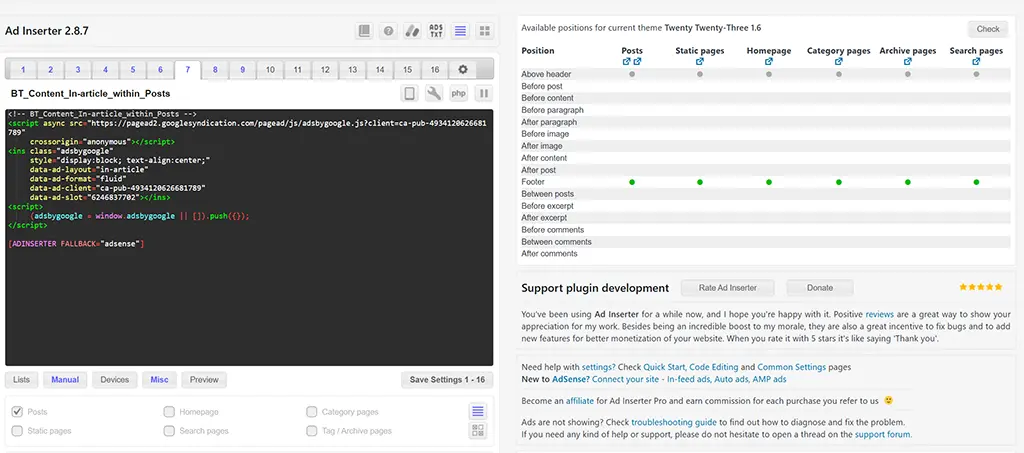
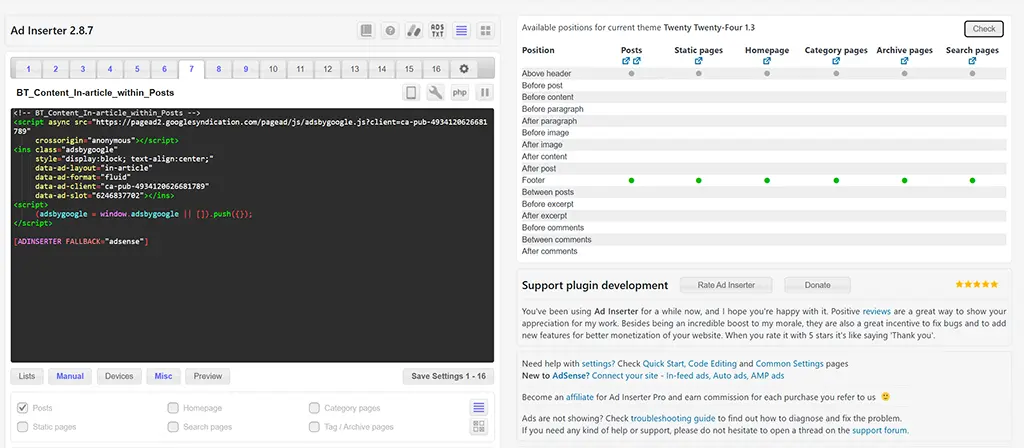
Automatic insertion positions depend on WordPress hooks (special functions) that WordPress or the theme used must call:
- the_content – used for positions Before/After content, Before/After paragraphs, Before/After images
- the_excerpt – used for positions Before/After excerpt
- loop_start – used for position Before post
- loop_end – used for position After post
- the_post – used for position Between posts
- wp_head – used for Header code (plugin settings, tab ⚙)
- wp_footer – used for position Footer and Footer code (plugin settings, tab ⚙)
- comments_array, wp_list_comments_args – used for positions Before/Between/After comments
The Before and After content, paragraph or image rely on the_content filter hook which is normally called before the post or static page is generated in order to process the content by the plugins. This hook is normally called only on posts and static pages and therefore insertions Before/After content and Before/After paragraph are available ONLY on posts and static pages.
It is up to the theme to call this filter hook also on other page types. Some themes create special blog pages that show post excerpts which are processed through the_content filter. In such case you will be able to use those insertions, however, excerpts are usually very short and HTML tags are usually stripped off.
the_content filter hook provides the content (text) of the post or page. Ad Inserter then analyzes this content, determines paragraphs and insertion positions. Then it inserts blocks at configured paragraph positions (or before/after content) and returns processed content back to the theme/WordPress.
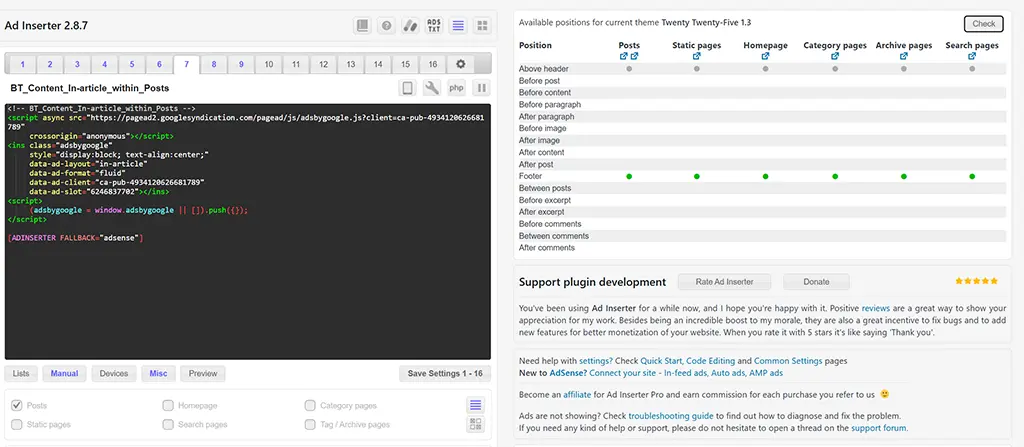
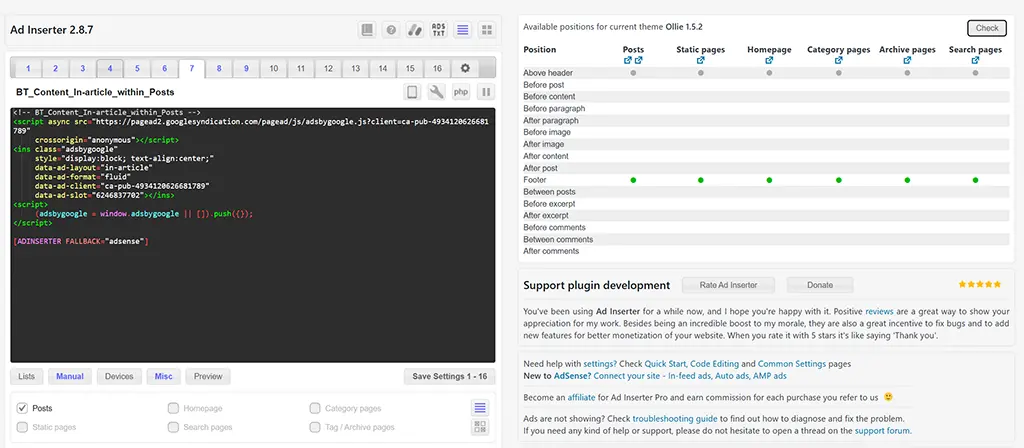
Using the checking tool built into AdInserter for checking the available positions for automatic insertion of ads we found that with the WordPress default block themes: Twenty Twenty Five, Twenty Twenty Four, Twenty Twenty Three and with block theme Ollie and Ollie Pro that auto ad insertion only works within the footer. Hence our need to use a snippet which is detailed above to replicate the %N@S functionality.
How we added in Vignette Ads…
Vignette ads which are full-screen ads that appear randomly between page loads, specifically when a user navigates away from or returns to a page are full page ads that are inserted between page transitions. They and the header ad now account for 57% of the ad revenue!
We have within our AdSense account set up auto ads again BUT only activated Vignette Ads. Google AdSense now automatically adds these. To do this we needed to load the auto load functionality in the header which we initially did via a snipppet. We have now opted to turn off the snippet and add the header code using AdIinserter. Now everything is managed within AdInserter which keeps things simpler!
<!-- Google AdSense Auto ads to enabale Vignette ads - All other ads inserted via AdInserter shortcode -->
<script async src="https://pagead2.googlesyndication.com/pagead/js/adsbygoogle.js?client=ca-pub-xxxxxxxxxxxxxxxx"
     crossorigin="anonymous"></script>
Ad Revenue recap after adding back ads within posts and implementing vignette ads
For the period 2023/24 BajanThings averaged ad revenue was US63¢ per day.
For the period 2024/25 when we removed ads within the content area of post the daily ad revenue dropped to US27¢ per day.
For the Period from August to September 2025 our ad revenue has jumped back to a little over what it was in 2023/24 and is averaging US67¢ per day. That suggest that our display ads have jumped from US27¢ per day to US47¢ per day and vignette ads are adding a further US20¢ per day.